
Excel Drillhole Visualizer/Resource Estimator
Deployed as a Microsoft Excel add-in, ThreeDify Excel CoreBlock (XLCoreBlock) is a Microsoft Excel based drill hole visualizer and quick resource estimator. By leveraging the popularity and ease-of-use of Microsoft Excel, XLCoreBlock has significantly lowered the learning curve and total cost of ownership for mining knowledge workers. It has become the go-to tool for field geologists, mining executives, investment banks and property owners.. XLCoreBlock consists of two modules that can be licensed separately.
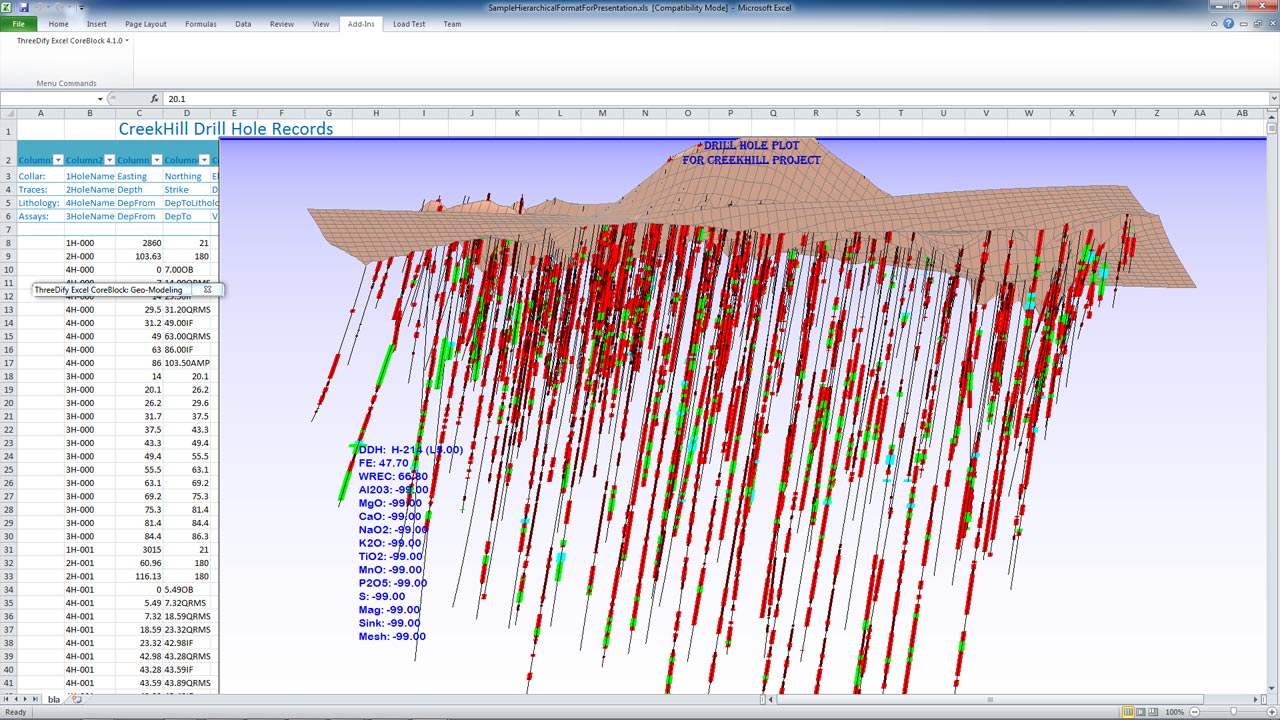
The CoreViz Module allows its users to visualize and validate assays, lithology and attributes (both continuous and categorical), making XLCoreBlock a potent Excel-based QA/QC DDH validation tool.
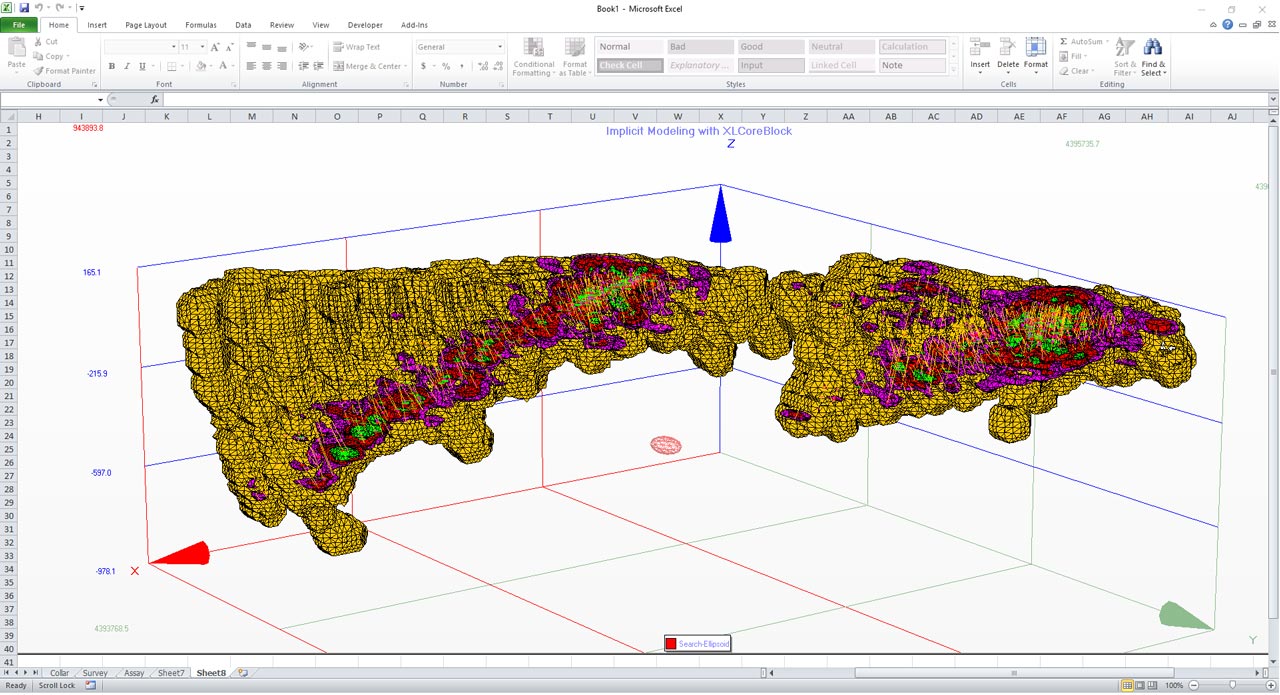
The BlockModel Module features implicit modeling based on a very fast implementation of anisotropic Radial Basis Function (RBF) interpolation. It allows the user to quickly create and export 3D block models and iso-grade surfaces or solids. The RBF interpolator is a global, automatic resource estimator with no need for tedious variogram modelling.
XLCoreBlock provides mining professionals with a quick, easy and cost-effective way to visualize, validate and analyse drillhole data in 3D directly within Microsoft Excel.
XLCoreBlock Key Benefits
- Easy-to-use: visualize and analyze your drillhole data in 3D, and conduct quick resource estimation within your familiar Microsoft Excel interface.
- Automatic: automated interpolation of block model grades and attributes for both single and multi-mineral deposits using 3D anisotropic RBF interpolators that support a user-defined search ellipsoid. No complex variogram modelling is needed. Ideal for investors, fund managers and field geologists who need quick estimates for their deposits.
- Flexible: you specify where data are in your worksheet(s). Supported data types include lithology, assay grades, continuous and categorical attributes,
- Efficient: there are no additional files or file formats to manage as generated 3D drill hole plots and block models are directly saved as part of the Excel file from which the plots and models are created.
- Convenient: you can also easily create AVI video animations for your 3D drillhole data and block models.
System Requirements:
CPU: Quad Core
RAM: 4gb
HARD DRIVE: 250gb SSD
VIDEO CARD: 1gb VRAM
Dependency: Microsoft Excel 2000 or newer for Windows
CPU: 3rd Gen Ryzen 5/7 or Intel i7
RAM: 12gb
HARD DRIVE: 500gb SSD
VIDEO CARD: 2gb VRAM
Dependency: Microsoft Excel 2000 or newer for Windows
XLCoreViz Feature
Specify drill hole records within Excel worksheet
Specify drill hole records within Excel worksheet with lithology, assays, and continuous and categorical attributes; Desurvey drill holes with choices of five desurvey algorithms (radius of curvature, minimum curvature, balanced tangential, average angle and linear).
Color-code drill holes
Color-code drill holes by lithology, assays, continuous or categorical attributes;
Create composites
Create composites, cap composite assay(s) to eliminate outliners, and export to GeoEAS format to be used by GSLib programs (for geostatistical analysis)
Downhole arnnotations
Downhole annotations and and real-time data tips.
Display and browse plans and cross sections in real-time
Display and browse plans and cross sections in real-time. Create topographical surface from drill hole collars.
Selectively show or hide drill holes
Selectively show or hide drill holes, assay or attribute intervals..
Mouse view manipulation
Zoom (mouse wheel scroll), Pan(middle mouse drag) and Spin (left mouse drag) and Spin Animate drill holes and block models.
Video formats.
export to DXF, VRML v2 and AVI video formats.
Supports two drawing and two camera modes
Supports two drawing modes: uniform and non-uniform scaling modes.
Supports two camera modes: Orthographic and Perspective.
Developer’s SDK
Developer’s SDK:Dual Interfaces (automation interfaces for VB and VBA, and vtbl interfaces for C++)
3D File Export
3D File Export: DXF, STL(binary), XGL
XLCoreBlock Feature
All XLCoreViz Features
All XLCoreViz features are included in XLCoreBlock
Automated block grade and attribute estimation
Automated block grade and attribute estimation using a ultra-fast 3D Anisotropic Radial Basis Function (RBF) interpolator. No variogram modelling is required.
Generate iso-surfaces or solids
Generate iso-surfaces or solids for assay grades or continuous attributes; Support both single and multi-mineral deposits.
Export block model to a flexible ASCII format
Export block model to a flexible ASCII format; Export iso-grade or iso-attribute surfaces and drill holes to DXF and VRML formats
Classify estimated blocks
Classify estimated blocks into measured, indicated and inferred classes
Demo Video
Resource Interpolation Tutorial
Cross-Section Creation Tutorial

Our mission is to empower our clients to turn data into insights, respond to project changes quickly, and improve efficiency, profitability, and sustainability.
Office Phone: +1-613-454-5327
Toll Free in North America: +1-855-760-4063